
For years, the conversation around AI art has been dominated by a dark cloud: copyright. Midjourney and Stable Diffusion were trained on billions of images scraped from the internet, leading to lawsuits and uncertainty. For a creative director at a marketing agency or a freelance designer working for a big brand, using those tools carries a hidden risk.
Adobe Firefly changes the narrative. It is the first generative AI model designed specifically to be “commercially safe.” It was trained exclusively on Adobe Stock images, openly licensed content, and public domain material. This means you can use it for global ad campaigns without fear of legal backlash. In this guide, we will explore how Firefly is not just a toy, but a serious production tool integrated directly into the software you already use.
The Copyright Advantage
Before we talk about features, we must address the legal safety, as this is Firefly’s biggest selling point.
When you generate an image in Firefly, Adobe is so confident in its legal standing that they offer “IP Indemnification” for their enterprise customers. This means if you get sued for using a Firefly image, Adobe will pay the legal bills. No other AI company offers this level of protection. For this reason alone, Firefly has become the standard for corporate design.
Generative Fill: Photoshop’s New Superpower
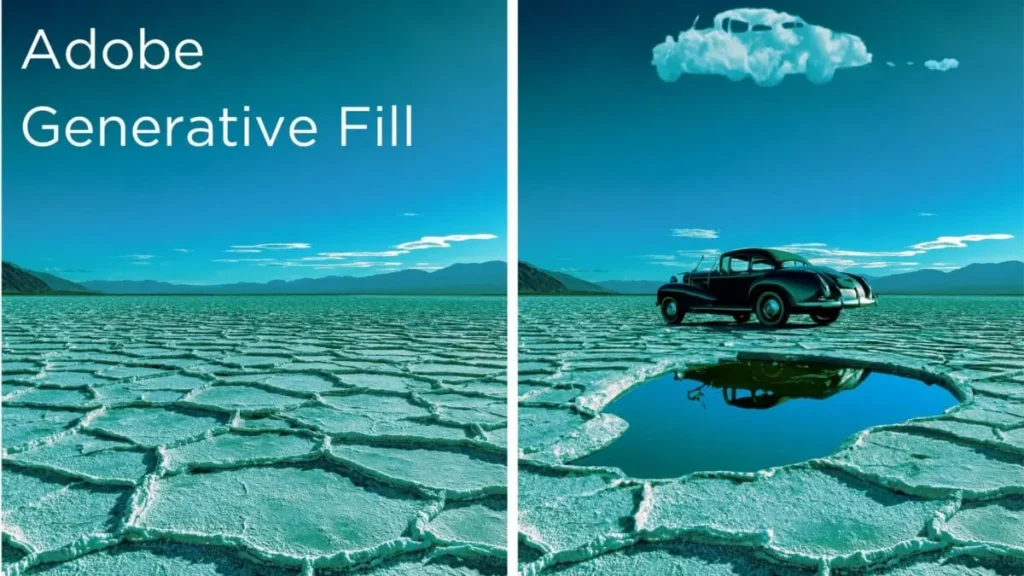
If you use Photoshop, you have likely seen the new taskbar. This is Firefly running inside the app, and it solves the most common photo editing problems in seconds.
expanding Images (Outpainting) You have a vertical photo for Instagram, but the client wants a horizontal banner for the website.
- Old Way: Spend hours cloning stamps and painting backgrounds.
- Firefly Way: Use the Crop tool to expand the canvas. Select the empty space. Click “Generative Fill” and leave the prompt blank. Firefly analyzes the lighting and texture of the original photo and seamlessly extends the world.
Object Removal and Replacement Need to change a model’s shirt from red to blue? Or remove a distracting tourist from the background?
- Simply circle the object.
- Type “Blue denim jacket.”
- Firefly generates the jacket, automatically adjusting the shadows and folds to match the lighting of the scene.
Text Effects: Typography With Texture
While other AIs struggle with text, Firefly has a dedicated “Text Effects” module. This is not about writing words; it is about styling them.
You can type a letter (like “A”) and give it a prompt like “Green dripping slime” or “Tangled electrical wires.” Firefly will render that texture inside the shape of the letter. This is incredibly useful for creating movie posters, event flyers, or playful YouTube thumbnails.
Structure Reference: Copying The Composition
One of the newest and most powerful features in the web version of Firefly is “Structure Reference.”
Often, you have a rough sketch or a stock photo with a perfect layout, but the content is wrong. You can upload that image as a reference. Firefly will then generate a completely new image that matches the exact structure of your upload.
- Example: Upload a photo of a messy room. Prompt: “A clean, futuristic sci-fi laboratory.”
- Result: The lab equipment will be placed exactly where the furniture was in the original photo.
Vector Recolor For Illustrator Users
For vector artists, Firefly offers a tool inside Adobe Illustrator called “Generative Recolor.”
Choosing color palettes is time-consuming. With this tool, you can take a complex vector illustration and simply type a mood like “Synthwave Neon” or “Pastel Spring Morning.” Firefly will instantly shuffle the colors of your vector paths to match that description. It creates multiple color variations in seconds, allowing you to present options to clients faster than ever.

Is The Quality Good Enough?
Honesty is important here. Does Firefly look as “artistic” as Midjourney v6? Generally, no. Midjourney creates more dramatic, stylized, and imaginative outputs.
However, Firefly excels at Photorealism and Integration. It creates images that look like high-quality stock photography. It creates assets that blend perfectly into existing photos. It is a utility tool, not an art generator.
Conclusion
Adobe Firefly is not trying to replace the artist. It is trying to remove the boring parts of the job. It handles the background extensions, the color variations, and the object removals so you can focus on the creative direction. If you are working in a commercial environment where safety and workflow integration are more important than raw artistic experimentation, Firefly is the only logical choice.